oracle on k8s
target: run oracle on k8s for develop.
version: 19c
mt1. 在哪找镜像?
Oracle 官方的镜像仓库:https://container-registry.oracle.com/
打开首页提示不在支持SSO password Login docker cli. 生成authtoken令牌。 
存储库中有很多edition
| edition | description |
|---|---|
| enterprise | Oracle Database Enterprise Edition |
| rac | Oracle Real Application Clusters |
| adb-free | Oracle Autonomous Database Free |
| express | Oracle Database Express Edition |
| free | Oracle Database Free Oracle |
| enterprise-ru | Oracle Database Enterprise Edition |
| rac-ru | Oracle Real Application Cluster Release Update Container Images |
adb-free edition 中有19c版本,存储库大小限制为20GB,作为开发目的,完全够用
latest 标签是19c版本,最低需要4CPU 8G内存 container-registry.oracle.com/database/adb-free:latest
adb-free 镜像大小为1.5G,拉取不需要身份验证
mt2. 部署容器
可用环境变量
| Environment variable | Description |
|---|---|
| WORKLOAD_TYPE | Can be either ATP or ADW. Default value is ATP |
| DATABASE_NAME | Database name should contain only alphanumeric characters. if not provided, the Database will be called either MYATP or MYADW depending on the passed workload type |
| ADMIN_PASSWORD | Admin user password must be between 12 and 30 characters long and must include at least one uppercase letter, one lowercase letter, and one numeric. The password cannot contain username |
| WALLET_PASSWORD | Wallet password must have a minimum length of eight characters and contain alphabetic characters combined with numbers or special characters. |
| ENABLE_ARCHIVE_LOG | To enable archive logging in the database. Default value is True. To turn off archive logging set the value to False |
端口
| Port | Description |
|---|---|
| 1521 | TLS |
| 1522 | mTLS |
| 8443 | HTTPS port for ORDS / APEX and Database Actions |
| 27017 | Mongo API |
卷
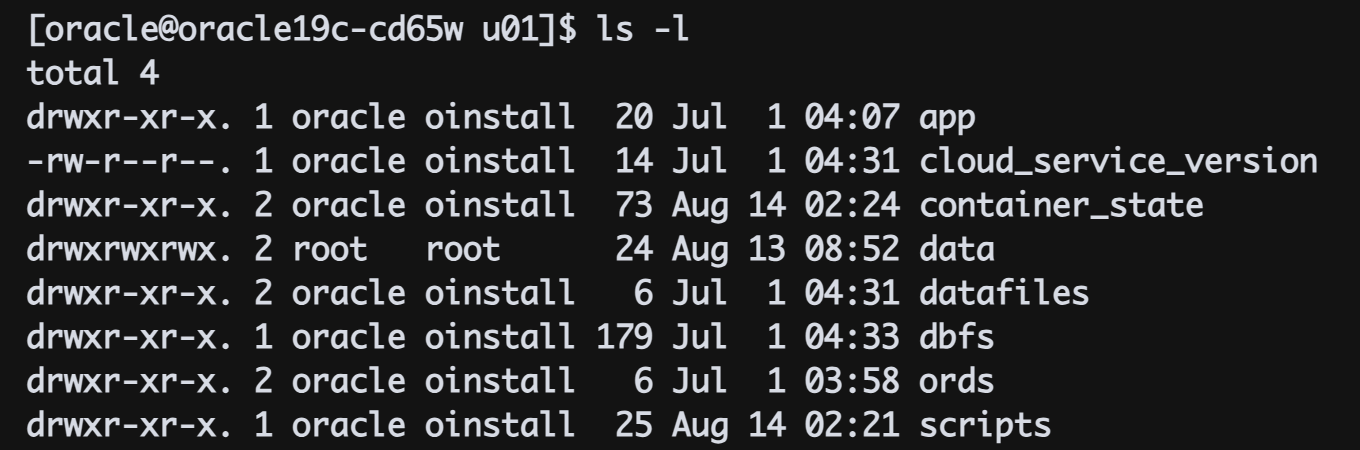
adb_container_volume:/u01/data
yaml
Reference
Oracle Database Operator,也称为 OraOperator,是Oracle 官方推出的一个Kubernetes 运算符,用于自动化Oracle 数据库在Kubernetes 环境中的部署和管理。它可以扩展Kubernetes API,引入自定义资源和控制器,从而实现对Oracle 数据库的生命周期管理自动化,包括数据库的创建、配置、备份、恢复等操作。
Oracle Instant Client 是一个轻量级的Oracle 数据库客户端,它允许用户在不安装完整Oracle 客户端的情况下,连接并使用Oracle 数据库。它提供了一系列必要的库、工具和头文件,方便开发和部署连接到Oracle 数据库的应用程序。
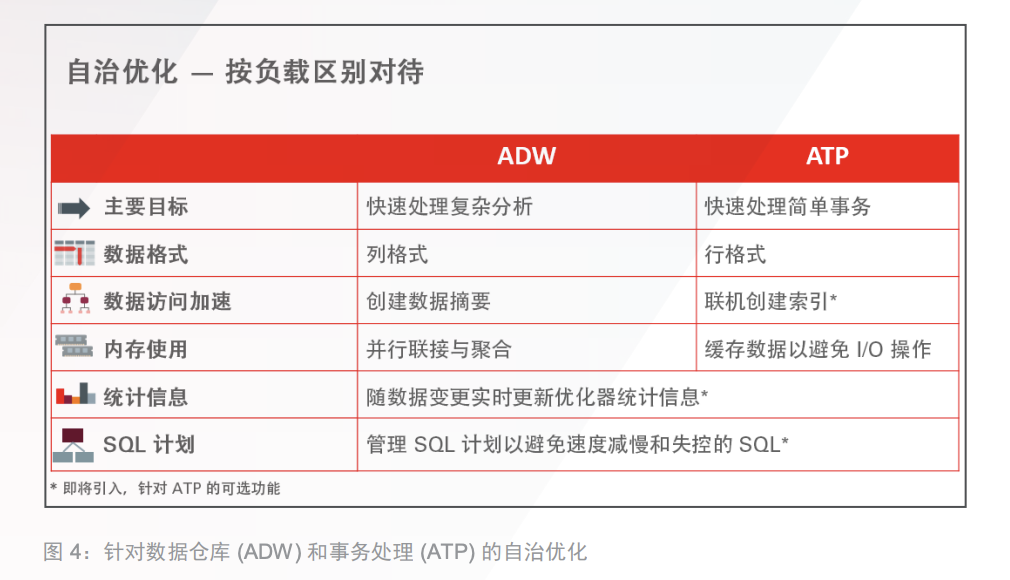
ADW 与 ATP 区别
自治管理面不同,根据应用场景进行选择,事务型应用选择ATP、数据分析型应用选择ADW
podman –device
podman –device 参数用于将主机设备添加到容器或Pod中。通过该参数,你可以指定要添加到容器或Pod中的设备,并设置相应的权限。
1
--device=主机设备[:容器设备][:权限]
主机设备: 指定要添加到容器或Pod中的主机设备,例如 /dev/sda1 或 /dev/ttyUSB0。 容器设备(可选): 指定容器内设备对应的路径,如果省略则默认为主机设备路径。 权限(可选): 指定设备的访问权限,可以使用 r (读), w (写), m (mknod) 组合,例如 rwm 表示读、写和mknod权限。
kubectl 一些操作
1
2
3
kubectl exec -ti <your-pod-name>  -n <your-namespace>  -- /bin/sh

kubectl expose replication/oracle19c --type="NodePort" --port 1521
Oracle Database 19c on Kubernetes with Portworx storage autonomous-database-container-free text