20250807
What do we say to the God of Death?
Not today
asp.net download file error
1
2
3
4
5
6
7
8
9
10
11
12
13
14
15
16
try
{
    var filePath = "the/path/of/file";
    var fileBytes = File.ReadAllBytes(filePath);
    var fileName = HttpUtility.UrlEncode(Path.GetFileName(filePath), System.Text.Encoding.UTF8);
    Response.Clear();
    Response.ContentType = MimeMapping.GetMimeMapping(fileName);
    Response.AddHeader("Content-Disposition", "attachment;filename=\"" + fileName + "\"");
    Response.AddHeader("Content-Length", fileBytes.Length.ToString());
    Response.BinaryWrite(fileBytes);
    Response.End();
}
catch (Exception ex)
{
    Response.Write(ex.Message);
}
这是一段C#代码作用是将文件从服务器上下载到客户端。看上去没有什么问题,并且在http协议下,正常运行。
但是切换到https协议,首先出现的错误是,chrome下载的时候提示 “失败-网络错误”。

在这一步删除Content-Length的头设置,https协议下可以“下载”文件了,并且能够正常打开如图片、word等文件。
但是,下载的excel文件打开提示 发现“xxx”中的部分内容有问题,是否让我们尽量尝试恢复?如果您信任此工作簿的源,请单击“是”。
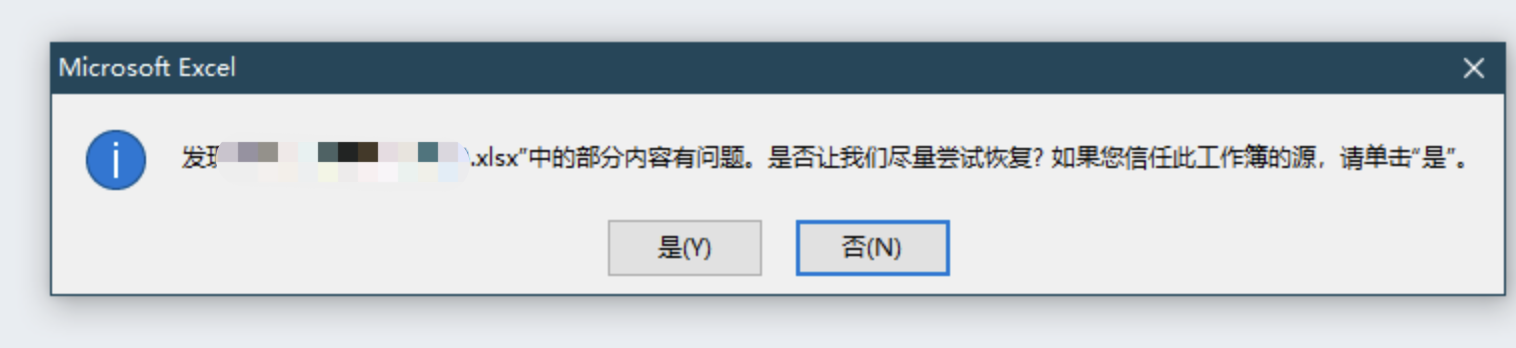
这时去对比源文件与下载后的文件发现,各种类型文件都会比原文件多出固定长度的字节数(我这儿43字节),ʕ•̀ o • ʔ
通过抓包发现,content最后都会附加一段 thread abort … 这样的文本。
也就是说 在response.end 之前进入了catch块。
总结:asp.net会在响应头设置content-length,不必手动声明,在http协议下,浏览器会根据声明的长度保存文件,但是在https下,强一致性校验,手动声明的content-length与实际返回的content-body中长度不一致会出现 “失败-网络错误”问题。然后因为进入了catch块,又追加了异常信息内容,导致与实际文件出现差异,在excel打开的时候会提示部分内容有问题这样的错误。
selenium call chromedriver error
错误: Message: session not created: probably user data directory is already in use, please specify a unique value for –user-data-dir argument, or don’t use –user-data-dir;
原因:chromedriver与chrome版本不一致、权限不足、缺少chrome运行必要库
1
2
3
# 执行chrome
# ./chrome-linux64/chrome --headless
./chrome-linux64/chrome: error while loading shared libraries: libatk-1.0.so.0: cannot open shared object file: No such file or directory
通过查看系统版本,安装chrome运行所需依赖
1
2
3
4
5
6
7
8
9
# 查看系统类型及版本
cat /etc/os-release
lsb_release -a
# 进入容器
docker exec -it <容器ID或名称> /bin/bash
# 更新源
sudo apt update
# 安装依赖
sudo apt install libatk1.0-0 libatk-bridge2.0-0 libcups2 libxkbcommon-x11-0 libxcomposite-dev libxdamage1 libxrandr2 libgbm-dev libcairo2-dev libpangocairo-1.0-0 libasound2
issue sessionnotcreatedexception
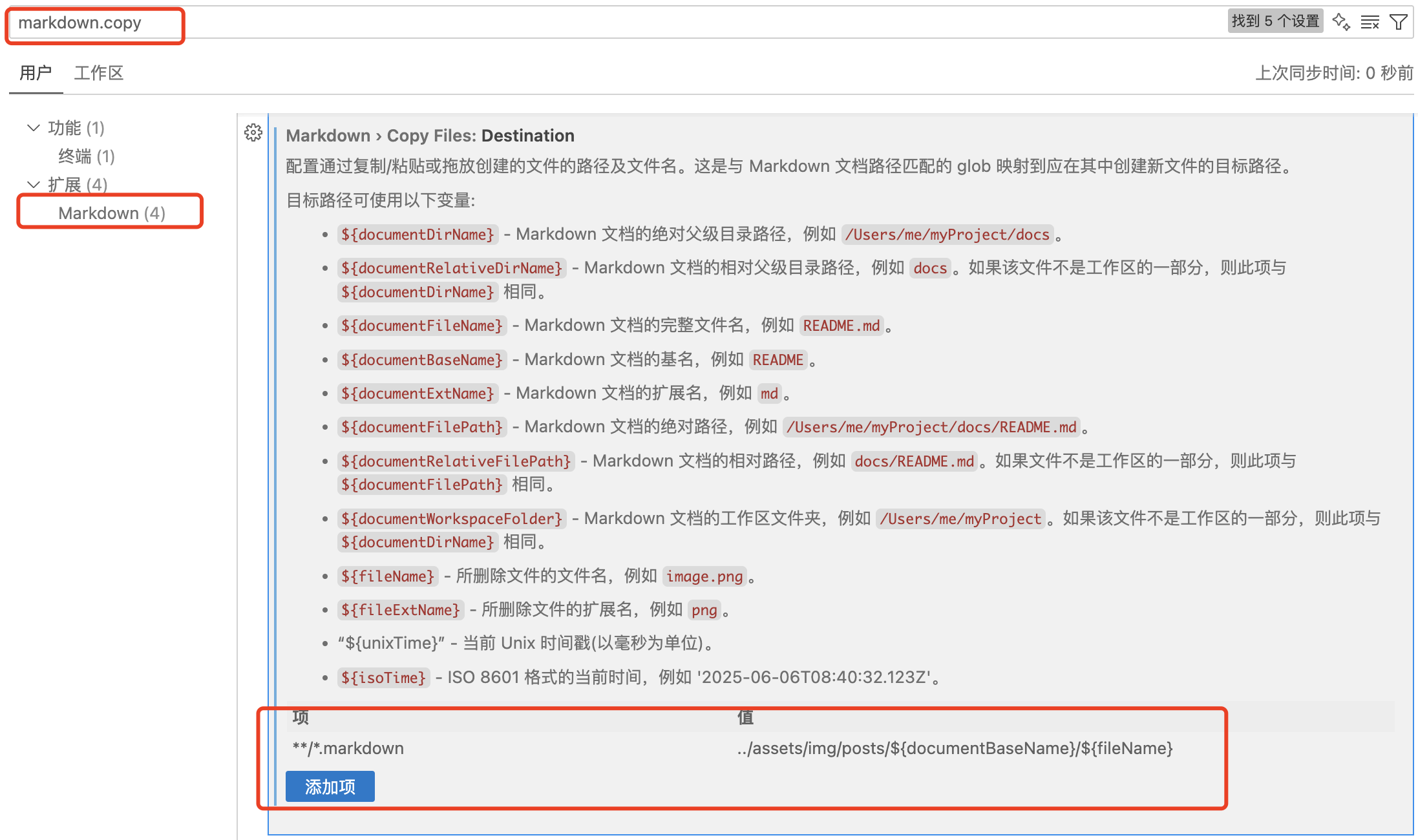
visisual code 设置markdown粘贴图片的指定位置
Ctrl + , –> markdown.copy –> Markdown > Copy Files:Destination
里面有预置的变量可以使用
我的设置是 ../assets/img/posts/${documentBaseName}/${fileName}